

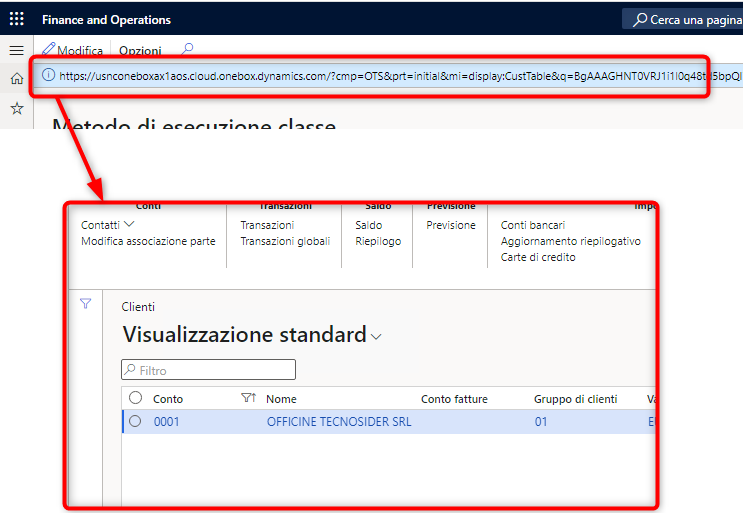
Share a Form record within AX with others by using a D365FO API.
By using Microsoft.Dynamics.AX.Framework.Utilities;
class DeepLinkTestJob
{
private static str buildAXURL(MenuItemName _menuItemName, MenuItemType _menuItemtype, DataSourceName _dataSource=”, FieldName _field=”, str _value=” )
{
UrlHelper.UrlGenerator generator = new UrlHelper.UrlGenerator();
System.Uri currentHost = new System.Uri(UrlUtility::getUrl());
generator.HostUrl = currentHost.GetLeftPart(System.UriPartial::Authority);
generator.Company = curExt();
generator.MenuItemName = _menuItemName;
generator.MenuItemType = _menuItemtype;
generator.Partition = getCurrentPartition();
generator.EncryptRequestQuery = true;
if(_dataSource != ”)
{
UrlHelper.RequestQueryParameterCollection requestQueryParameterCollection;
requestQueryParameterCollection = generator.RequestQueryParameterCollection;
requestQueryParameterCollection.UpdateOrAddEntry(_dataSource, _field, _value);
}
System.Uri fullURI = generator.GenerateFullUrl();
return fullURI.AbsoluteUri;
}
public static void main(Args _args)
{
str link;
link = generateURL::buildAXURL(menuItemDisplayStr(CustTable), MenuItemType::Display, formDataSourceStr(CustTable,CustTable), fieldstr(CustTable, AccountNum), “0001” );
info(link);
}
}
For more information you can reach out to us at care@digivert.in or WhatsApp us at + 91 9990281800.